Please fill out this survey before you get started on the lab.
For this lab you will work individually.
We will be using git for all of our labs. If you need a refresher, see https://www.cs.swarthmore.edu/git/
Do the following steps to get the starting point code. Note that in the steps below that the $ represents the prompt.
$ mkdir cs33
$ cd cs33
$ git clone git@github.swarthmore.edu:CS33-F26/lab01-USERNAME.git
This week we discussed Melanie Mitchell's article Jagged intelligence: The dangerous unknowns at the heart of LLMs published in The Yale Review June, 2026. You will be testing out some of the issues she raised in this article using a local LLM model running on the CS system.
We will be using an open LLM model called llama3.2:3b from ollama.com. This particular model is considered to be relatively small with only 3 billion parameters, while the latest commercial LLMs have hundreds of billions to several trillion parameters. So its abilities will not match the current state of the art, however, it is still quite good at many tasks including following instructions and summarizing. It is also multilingual and can converse in English, German, French, Italian, Portuguese, Hindi, Spanish, and Thai. One of the benefits of using a smaller, local model is that it significantly reduces the resources needed (in terms of energy) to produce responses.
Before we can interact with the model as a chatbot we need to invoke the CS33 virtual environment containing all of the software you'll use in this class. In a terminal window, type in the following command (where $ represents the prompt):
$ source /usr/swat/bin/cs33env
Your terminal prompt will change to (cs33-f26), which indicates that you have successfully invoked the CS33 virtual environment. Now you can start up the ollama model by typing:
(cs33-f26) $ ollama run llama3.2:3b
It will take some time for the LLM to load. When you see a prompt like this, it is ready to chat:
>>>Try interacting with the model by chatting about a few topics. To exit the chat press CTRL-D. To exit the CS33 virtual environment type deactivate. Exit from both now.
For this lab, you will not be doing any programming. Instead, you will be prompting an LLM and reporting on the results in a written document. You will be learning how to use LaTeX (typically pronounced "LAH-tek") to write up your results. LaTeX is similar to a markup language. You type your text into a plain text file with a .tex extension, and add special commands to format the text. Then you run your .tex file through a compilation process to produce a PDF file. We have provided you with the following starting point files in your git repo:
Using your favorite editor, open the file LLM_evaluation.tex. If this is your first CS course at Swarthmore, a good starting editor to use is code. In the LaTex file, replace the placeholder Your name with your actual name. Save the file. Now let's compile it and see how it looks. To compile it type:
$ make
If all went well, you should be able to use the Unix command ls to see that there is now a PDF version of the file. To view the PDF file type:
$ evince LLM_evaluation.pdf
As you are working on this lab, remember that you'll have to continually edit, save, compile, and view your written work using these steps.
NOTE: We will be grading the PDF that is produced. So when you view the PDF version of your work, be sure that all of your responses are showing up in full. For example, in the verbatim blocks you will likely need to add line breaks to lines that exceed 80 characters.
In the paper, Mitchell gives an example of a word problem with some extraneous facts added in (see the italicized phrase below) that caused problems for LLMs to properly solve:
Oliver picks 44 kiwis on Friday. Then he picks 58 kiwis on Saturday. On Sunday, he picks double the number of kiwis he did on Friday, but 5 of them were a bit smaller. How many kiwis does Oliver have?Create your own word problem. It need not follow this exact pattern. First try your new problem on at least one other student in the class. It should be easy for humans to solve. Feel free to use smaller numbers.
Next try it on the LLM, first with the irrelevant information. If the LLM correctly solves your word problem, then come up with a new one. We want to see an example where it fails.
Once you have a word problem with irrelvant information that causes the LLM to fail, then try the same problem with the irrelvant information removed.
Write up your results in the file LLM_evaluation.tex. Cut and paste the LLM's responses into the verbatim blocks. Then reflect on how the LLM performed. Run make and then look at the resulting PDF using evince. Correct any issues before moving on to the next section.
The Winograd Schemas are often used to benchmark LLMs. The key idea is to create a pair of sentences that are identical except for one key word or phrase. Both sentences contain a pronoun that could grammatically be associated with either noun, but semantically makes sense for one noun. For example, consider these two sentences where the pronoun is it and the two nouns are either trophy or suitcase:
In the first sentence the it refers to the trophy. While in the second sentence the it refers to the suitcase.
LLMs excel at syntax, but can struggle with semantics. Find one example from this list of Winograd Schemas that causes the LLM to fail to make the correct pronoun association in at least one of the paired sentences.
Test the LLM on each sentence individually. For example, if you were to prompt the LLM using the first sentence above you should construct your question like this:
Help me interpret this sentence: The trophy doesn't fit in the brown
suitcase because it is too large. What is too large?
Write up your results in the file LLM_evaluation.tex. Be sure to explain what the correct interpretation of each sentence should be. Cut and paste the LLM's responses into the verbatim blocks. Then reflect on how the LLM performed. Run make and then look at the resulting PDF using evince. Correct any issues before moving on to the next section.
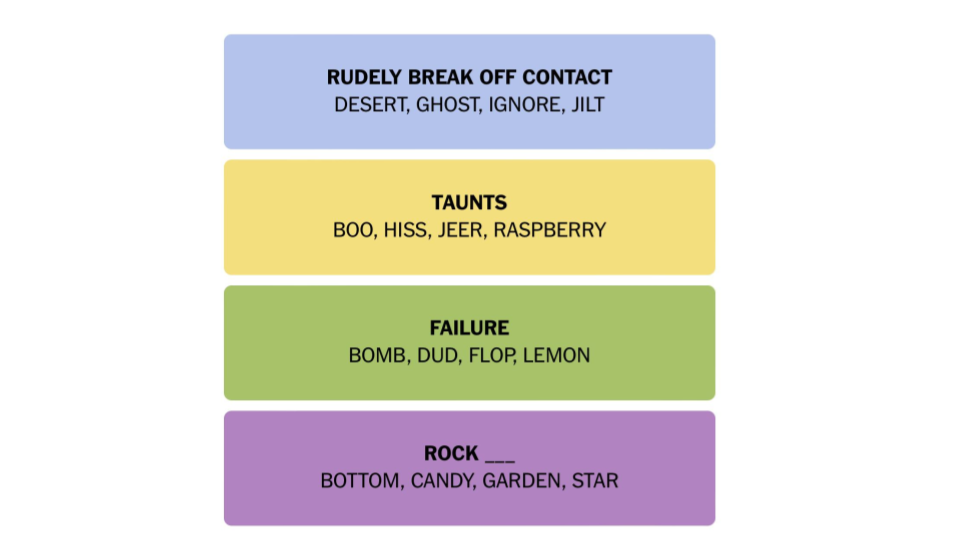
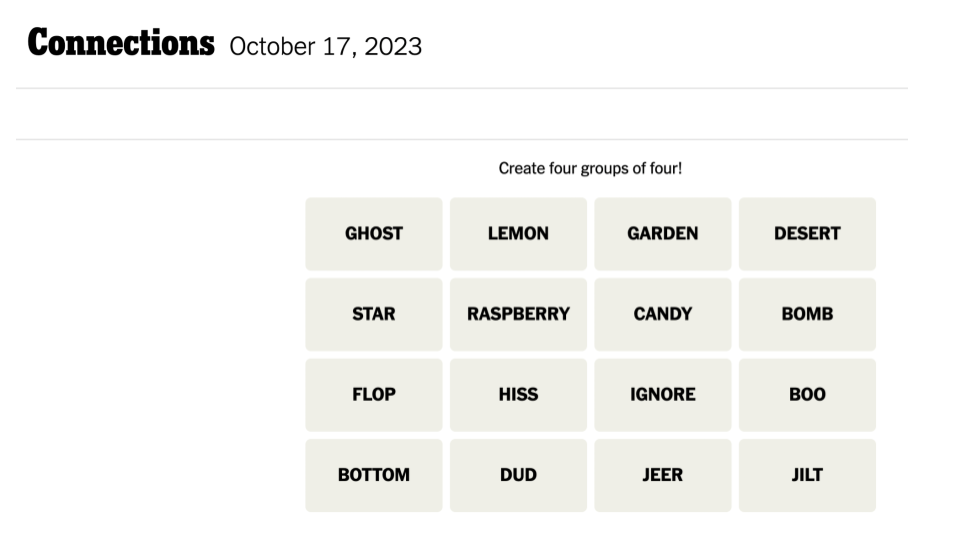
The New York Times has a daily game called Connections. You are given 16 words, and your goal is to sort these words into 4 categories of size 4 by finding the connections between them. Each word can only be included in one category. For example, you might have a category FISH that includes BASS, FLOUNDER, SALMON, and TROUT. Or you may have a category such as FIRE ____, which are words that can appear after the word FIRE, such as ANT, DRILL, ISLAND, and OPAL.
This is a challenging game because it requires a lot of background knowledge, and the player must grapple with the many different meanings each word can take on. For example the word BASS could be a string instrument, a vocal range, or a fish. Below is an example Connections game from 2023. See if you can solve it.
Write down your thinking process as you are working on it. What words initially stuck out to you? How did you think they might be related to other words? Some of these words may have meanings that you've never heard before. For example, did you know that RASPBERRY can mean a rude sound used to show disapproval?
After you've grappled with the puzzle, now see how the LLM fares. Be sure that your initial prompt explains the game clearly. Perhaps something like this:
Let's play a word game called connections. I will give you 16 words.
Your goal is to sort these words into 4 categories of 4 by finding the
connections between them. Each word can only be used in one group. Give
me one group of words at a time and I will tell you if you are correct.
Here are the words: ...
If the LLM incorrectly guesses a first group, try giving it a hint to guide it towards a valid group. Continue to give hints as needed. Once it successfully finds one group, inform it, and ask for another group. Is it able to solve the puzzle with your help? Reflect on its problem solving process.
Write up your results in the file LLM_evaluation.tex. Cut and paste both your hints and the LLM's responses into the verbatim blocks. Note: you do not need to include the entire interaction, just enough to get a sense of how the LLM is doing with the puzzle.
In the analysis section, reflect on how the LLM tried to solve the connections game. What did it struggle with? What did it succeed at?
Write up your results in the file LLM_evaluation.tex. Run make and then look at the resulting PDF using evince. Correct any issues before moving on.
Finally ask the LLM to come up with a Connections game for you to play. You do not need to include your entire conversation, but enough to get the gist of the created puzzle and the LLM's understanding of the connections between the word groups.
In the analysis section, reflect on the LLM's ability to create an interesting puzzle for you. Comment on how challenging the LLM's puzzle was for you to complete. Do the categories make sense?
Write up your results in the file LLM_evaluation.tex. Run make and then look at the resulting PDF using evince. Correct any issues before moving on.
We've seen that the relatively small, locally installed LLM that you've been experimenting with, called llama3.2:3b, has struggled to handle some of the tasks that we've set for it. You might be wondering how a larger and more advanced model would perform.
The College provides free access to a large selection of LLMs with a broad range of sizes and capabilities. To use these models you must either be on campus or logged on to the College's VPN. Go to the LibreChat website and scroll down to the list of available models. Consider which model you'd like to try. Then follow the "Getting Started" instructions to log in and start an interaction with your chosen model.
Pick one of the tasks that we previously explored and summarize how this LLM fares. It is highly likely that these larger and more advanced models will outperform the previous model. However, it is important to keep in mind that these models have probably been trained specifically on these benchmarks, even Connections puzzles, because these have been identified as areas of struggle. And, the larger the model, the more chance that it is able to memorize specific training data. In your reflection, discuss whether memorization reflects true understanding.
Write up your results in the file LLM_evaluation.tex. Run make and then look at the resulting PDF using evince. Correct any issues before moving on.
Use git to add, commit, and push your work.
The colors of each group represent the perceived difficulty of the category, with blue being the easiest, and purple the hardest.