You should have a github repo ready to go by the time lab starts. Please let the instructor know if you have any issues accessing it.
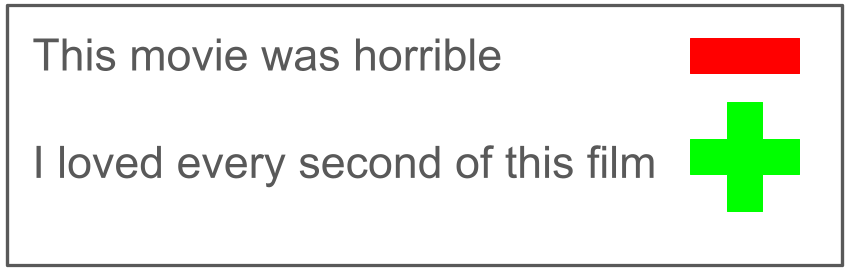
The goal of sentiment analysis is to determine whether a given text is positive or negative in tone. For example, given a movie review such as "I loved every second of this film", a sentiment analysis program should be able to determine that this is a positive review. While the review "This movie was horrible" expresses a negative opinion. In part 1 of this lab you will implement a sentiment analysis program in python for movie reviews. Then in part 2 of this lab you will explore how well your system performs when compared to a large language model.
We have provided three files containing movie reviews, which come from the Rotten Tomatoes website. These can be found in the directory /usr/local/doc:
Each file has the same format. There is one review per line. Each line starts with the review's sentiment score, which is an integer between 0 and 4, where 0 represents the most negative score, 2 a neutral score, and 4 the most positive score. The score is followed by the content in the review, which have already been pre-processed so that all words and punctuation are separated by blank space. For example, here are the first few lines from the training data:
0 Devoid of any of the qualities that made the first film so special .
4 The Bai brothers have taken an small slice of history and opened it up for all ...
3 Ramsay and Morton fill this character study with poetic force and buoyant ...
1 You emerge dazed , confused as to whether you 've seen pornography or documentary .
We call each individual unit of the text a token. Notice that most of the tokens are words, but some tokens are punctuation (such as a comma , or a period .) and some tokens are parts of words (such as 've).
We can estimate the sentiment of a token by averaging the sentiment scores of all of the reviews in which that token appears. For example, if the token terribly appears in three reviews with scores of 0, 0, and 3, then its estimated sentiment score would be (0+0+3)/3, which is 1. This score is somewhat negative, as we would expect given the meaning of this word.
Once we have sentiment scores for lots of tokens, we can use these to predict the sentiment of a new movie review by averaging the sentiment scores of all the tokens in that review.
In order to estimate the token sentiment scores we will use a python dictionary. The keys to this dictionary will be all of the unique tokens present in a set of movie reviews. The value associated with each key will be another dictionary that tracks important information about each token:
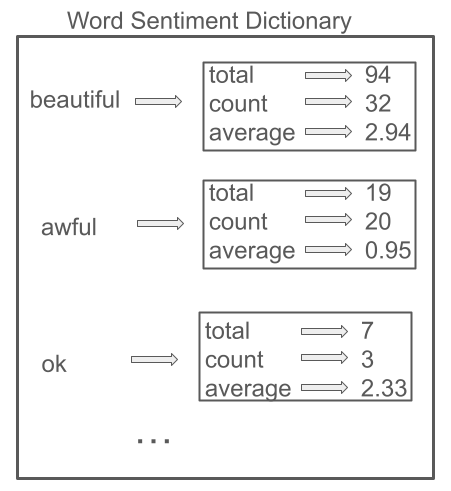
For example, below is a visualization of a few tokens within the sentiment dictionary. Notice that of these three tokens, beautiful has the most positive score (closer to 4), awful has the most negative score (closer to 0), and ok is more neutral (closer to 2).
In the file sentiment_analysis.py, you are provided the scaffolding for a SentimentAnalysis class. Implement the method make_sentiment_dictionary that when given the name of a file that contains a set of movie reviews will build and store a sentiment dictionary as a field of the class.
Note: You should lower case all words before adding them to the dictionary.
In the main program, create a SentimentAnalysis object and call your make_sentiment_dictionary method on the file movie_reviews_mini.txt (remember to include the full path). Print the length of the resulting dictionary. You should have found 196 tokens. Print out the values associated with several tokens such as nice and the. Do the results make sense?
Once you're convinced that you've correctly created the sentiment dictionary, test out your method on the much larger file movie_reviews_training.txt. Now you should have found 13,917 tokens. Print out the values associated with the tokens beautiful, awful, and ok. The results should match the figure above (don't worry, if your results include more decimal places for the averages).
Next, implement the method explore_dictionary. Your goal is to print out the ten tokens with the highest sentiment scores as well as the ten tokens with the lowest sentiment scores. However, we only want to consider tokens that appear at least ten times within the set of movie reviews. One approach to solving this is to:
Test your method in the main program. The token with the lowest score should be stupid and the token with the highest score should be dazzling.
Implement the method predict_sentiment_score that when given a movie review as a string returns an estimated sentiment score for the review. It should estimate the score by averaging the scores of all of the tokens in the review.
Note: A movie review may contain some tokens that are not in the sentiment dictionary. For these tokens just assume that they are neutral and assign them a score of 2.
Test your method in the main program. For example, given the review "This movie was horrible !" and the sentiment dictionary created from the data in movie_reviews_training.txt, this method should return a value that rounds up to 1.6.
Our primary goal in sentiment analysis is to determine whether the overall sentiment is positive or negative. In the case of movie reviews, we want to know whether it is worth going to see the movie or not.
Implement the method is_positive that when given a movie review as a string it uses the predict_sentiment_score method as a helper and returns a boolean value to indicate whether the review is positive (with an average score greater than the threshold) or not.
Note: The constructor sets the threshold field to a default of 2, but you can change its value if you like.
Implement the method evaluate so that when given a sentiment dictionary and a filename tests how well the dictionary is able to accurately predict whether the the movie reviews in the file are positive or negative. Your method should print the results like this:
predicted correctly:    544/800 68.0%
predicted incorrectly:  256/800 32.0%
Test the evaluate method in your main program using the sentiment dictionary built based on the training data and apply it to the testing data with 800 reviews. You should see results where the system gets at least 60% correct. With further fine tuning of the method is_positive, you should be able to get at least 75% correct. Try playing around with the threshold you are using to decide whether a review is considered positive or not. By default this threshold was set to 2. What happens if you increase it or decrease it slightly by passing in a different threshold value when you construct the original sentiment analysis object?
Clearly this system is not perfect and is misclassifying about a quarter of all of the test cases. Let's see if you can craft your own reviews to purposefully fool the system. Go back and look at the ten tokens with the highest sentiment scores and the ten tokens with the lowest sentiment scores that you found in the word sentiment dictionary. Craft a negative review that uses positive tokens and print the prediction. Also craft a positive review that uses negative tokens and print the prediction. Add code to the main program using predict_sentiment_score to show that your reviews fool the model. You should show output like the following:
Using positive tokens in a negative review:
your review here
Prediction is ...

Using negative tokens in a positive review:
your review here
Prediction is ...
Your goal is to try to get a prediction above 2 for the first example and below 2 for the second example.
We will be using an open LLM model, called llama3.2:3b from ollama.com that is available on the CS system. This particular model is considered to be relatively small with only 3 billion parameters, while the latest commercial LLMs have hundreds of billions to several trillion parameters. So its abilities will not match the current state of the art, however, it is still quite good at many tasks including following instructions and summarizing.
Let's start by interacting directly with the model in chat mode. First, you'll need to be in the CS33 virtual environment and then you can run the model:
  source /usr/swat/bin/cs33env
  ollama run llama3.2:3b
It will take some time for the LLM to load. When you see a prompt like this, it is ready to chat:
>>>
Test the LLM on the same two purposefully difficult movie reviews that you created earlier to fool the model. Update the file test_llm.txt with the results of your chat interaction, including both your prompts and the responses.
When you are ready to end the chat press CTRL-D.Rather than chatting directly with the LLM, we can instead interact with it programatically. In the file use_llm.py, you need to complete the function query_llm. When initiating a chat via a program, there a number of roles that you can define:
Set the system and user content so that you get appropriate responses from the LLM. Be sure to test this function before moving on. This may take a number of iterations for you to get your desired responses. This process is known as prompt engineering. You are trying to guide the LLM, using natural language, to produce predictable and useful responses for the task.
Using the previous function as a helper, implement the evaluate_llm function. This will have a similar structure to the evaluate method that you wrote previously. We want to compare how well the LLM does at classifying all of the reviews in the testing file to our previous word sentiment dictionary approach.
Remember that the LLM always returns strings. So test its responses appropriately. Also the LLM requires significantly more processing time to analyze all 800 reviews in the testing file (it typically takes about 3 minutes). Therefore it is essential that you do your initial testing on only a portion of this file, or use the mini file.
Because the LLM will take a significant amount of time to analyze all of the reviews, you are required to add toggleable verbose output to see the progress of the LLM. The function evaluate_llm should print the following information based on the verbosity parameter:
predicted correctly:    544/800 68.0%
predicted incorrectly:  256/800 32.0%
Iteration:  25 Correct: 84.0% Incorrect: 16.0%
Iteration:  50 Correct: 90.0% Incorrect: 10.0%
Iteration:  75 Correct: 89.3% Incorrect: 10.7%
Iteration: 100 Correct: 84.0% Incorrect: 16.0%
...
Original score: 1 LLM predicts: False
Original score: 1 LLM predicts: False
Original score: 1 LLM predicts: False
Original score: 4 LLM predicts: True
Original score: 3 LLM predicts: False
Incorrect
Review: A film that will be best appreciated by those willing to endure its extremely
languorous rhythms , Waiting for Happiness is ultimately thoughtful without having much
dramatic impact .
Original score: 3 LLM predicts: True
Original score: 0 LLM predicts: False
Original score: 1 LLM predicts: False
Original score: 0 LLM predicts: False
Original score: 1 LLM predicts: False
Original score: 3 LLM predicts: False
Incorrect
Review: In questioning the election process , Payami graphically illustrates the problems
of fledgling democracies , but also the strength and sense of freedom the Iranian people
already possess , with or without access to the ballot box .
Original score: 3 LLM predicts: False
Incorrect
Review: Probably the best case for Christianity since Chesterton and Lewis .
Original score: 4 LLM predicts: True
Original score: 0 LLM predicts: False
Original score: 2 LLM predicts: False
Original score: 1 LLM predicts: False
Original score: 3 LLM predicts: False
Incorrect
Review: Kosminsky ... puts enough salt into the wounds of the tortured and self-conscious
material to make it sting .
Original score: 1 LLM predicts: False
Original score: 1 LLM predicts: False
Original score: 1 LLM predicts: False
Original score: 0 LLM predicts: False
Original score: 0 LLM predicts: False
Original score: 1 LLM predicts: False
Original score: 3 LLM predicts: True
Original score: 3 LLM predicts: True
Iteration:  25 Correct: 84.0% Incorrect: 16.0%
Original score: 4 LLM predicts: True
Original score: 2 LLM predicts: False
Original score: 1 LLM predicts: False
...
Add tests to check that the different verbose levels work as expected.
At the end of the file test_llm.txt, report on whether the LLM outperforms the word sentiment dictionary.
As usual, use git to add, commit, and push your work.
Thank you to Kristina Striegnitz at Union College for sharing her sentiment analysis assignment which this lab is based upon.