Using Git History
git has many commands for viewing a project’s history of commits and either
restoring file versions or reverting to previous changes.
This guide covers basic uses of log, revert, restore, and reset.
Git History Structure
git stores history as a directed acyclic graph of commits. That is,
time goes in one direction, but one commit can be based on multiple other
commits if merges happen. Because of this, history can be complicated if
there are multiple development branches.
However, it’s always possible to view history and analyze versions of a repository at different commits. Each commit is labeled with a SHA-1 hash, essentially a long string of letters and numbers.
Git Log
The git log command shows the local history of the repo that you are
currently in. More recent commits are shown at the top, and older commits are
shown at the bottom.
Here is some example git log output:
commit cea775400b331f12a97aed76dd8185f3302f9d71
Author: Charlie Kazer <9405684+ckazer@users.noreply.github.com>
Date:   Thu Aug 27 12:11:05 2026 -0400

    create foo.cpp

commit 8978c1ac9ee39e0d97e184a2b685898583787440
Author: Charlie Kazer <9405684+ckazer@users.noreply.github.com>
Date:   Thu Aug 27 12:10:35 2026 -0400

    add name and year

commit 61a7986e0141d664da3cd3fde653a9a56ae03069
Author: Charlie Kazer <9405684+ckazer@users.noreply.github.com>
Date:   Wed Aug 26 15:58:24 2026 -0400

    Initial commit.
This history shows a repo with three commits. The most recent commit has
a label starting with cea775. All three were authored by Charlie Kazer,
and the commit message for each is listed.
Fancy Log
git log can accept many different options to color, arrange, and filter
the history that it shows. For example, we can visualize merges with the
all, graph, and color options.
$ git log --all --graph --colorHere is the output for a repo with multiple merges:
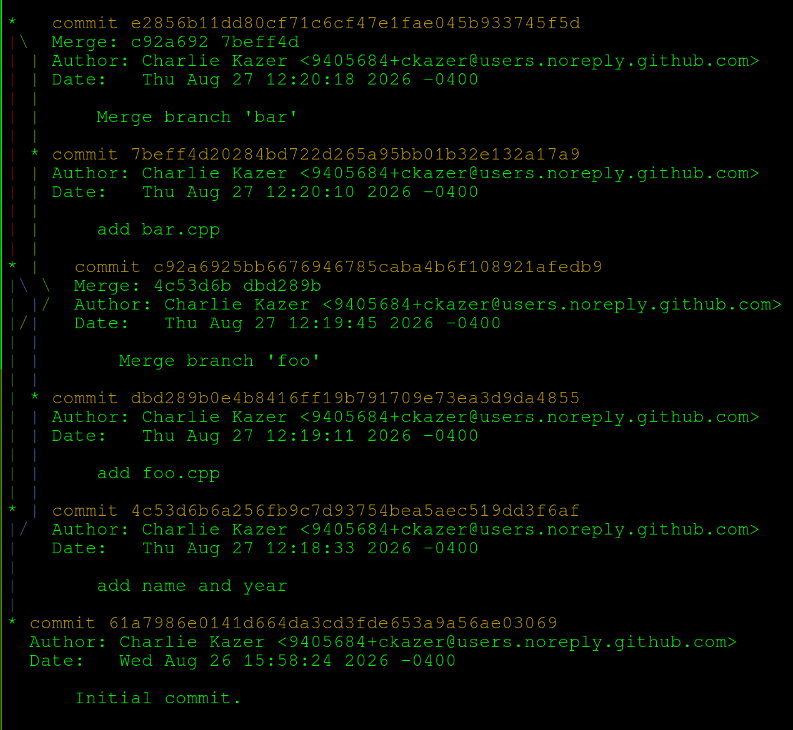
See man git-log for more information and options.
Git Revert
Sometimes, you may want to completely undo a commit, e.g. if it introduces
a critical bug. git revert can make a commit which undoes another commit.
The general command is
git revert <commit>where <commit> is the SHA-1 hash identifying a commit.
Suppose we had the following history:
commit 47a4bd650b127133151072429cde7717d9cefad9
Author: Charlie Kazer <9405684+ckazer@users.noreply.github.com>
Date:   Thu Aug 27 12:33:11 2026 -0400

    foo.cpp

commit c28399b4357d9735c5d5083fbe5218d75b74a69c
Author: Charlie Kazer <9405684+ckazer@users.noreply.github.com>
Date:   Thu Aug 27 12:32:57 2026 -0400

    add name and class year

commit 61a7986e0141d664da3cd3fde653a9a56ae03069
Author: Charlie Kazer <9405684+ckazer@users.noreply.github.com>
Date:   Wed Aug 26 15:58:24 2026 -0400

    Initial commit.
But, we wanted to undo the change to add foo.cpp because it is buggy. We
could do
$ git revert 47a4This adds a new commit undoing the previous one.
| When referring to a commit hash, you do not need to type out the entire string. A unique prefix that is at least four characters works. |
$ git log

commit c9476182384ee7809ab96385f1a88fba6971bc62
Author: Charlie Kazer <9405684+ckazer@users.noreply.github.com>
Date:   Thu Aug 27 12:37:25 2026 -0400

    Revert "foo.cpp"

    This reverts commit 47a4bd650b127133151072429cde7717d9cefad9.

commit 47a4bd650b127133151072429cde7717d9cefad9
Author: Charlie Kazer <9405684+ckazer@users.noreply.github.com>
Date:   Thu Aug 27 12:33:11 2026 -0400

    foo.cpp

commit c28399b4357d9735c5d5083fbe5218d75b74a69c
Author: Charlie Kazer <9405684+ckazer@users.noreply.github.com>
Date:   Thu Aug 27 12:32:57 2026 -0400

    add name and class year

commit 61a7986e0141d664da3cd3fde653a9a56ae03069
Author: Charlie Kazer <9405684+ckazer@users.noreply.github.com>
Date:   Wed Aug 26 15:58:24 2026 -0400

    Initial commit.
Git Restore
Suppose you made changes to a bunch of files over past 3 or 4 commits, but you
want to recover a single file that was changed 4 commits ago. git restore
allows you to restore a file to the same state as in a previous commit.
The general command is
git restore --source <commit> <file>where <commit> is the SHA-1 hash identifying a commit, and <file> is
the file you want to restore the state of.
Following the the example log above suppose we make a commit that modifies both
foo.cpp and name_year.txt. Later on, we want to undo the changes to
name_year.txt, but keep foo.cpp at the latest version.
commit 74bc9eb6ce1f4624744789e1d376758871fc7747
Author: Charlie Kazer <9405684+ckazer@users.noreply.github.com>
Date:   Fri Aug 28 13:41:27 2026 -0400

    Start foo main function. Update name

commit 47a4bd650b127133151072429cde7717d9cefad9
Author: Charlie Kazer <9405684+ckazer@users.noreply.github.com>
Date:   Thu Aug 27 12:33:11 2026 -0400

    foo.cpp

commit c28399b4357d9735c5d5083fbe5218d75b74a69c
Author: Charlie Kazer <9405684+ckazer@users.noreply.github.com>
Date:   Thu Aug 27 12:32:57 2026 -0400

    add name and class year

commit 61a7986e0141d664da3cd3fde653a9a56ae03069
Author: Charlie Kazer <9405684+ckazer@users.noreply.github.com>
Date:   Wed Aug 26 15:58:24 2026 -0400

    Initial commit.
We could use the command
$ git restore --source c283 name_year.txtThis changes the file to be the same as the version in the c283 commit, but
does not make a new commit. To commit the changes, you would have to use
git add and git commit as normal.
Discarding Edits Since Last Commit
git restore can also be used to discard any changes made since the last
commit. In this case, just use
$ git restore <file>git will infer that you want to change <file> to the state of the most
recent commit.
Git Reset
Occasionally, you may want to entirely discard either your changes since the
last commit, or even an entire previous commit. git reset allows you to
change what files are staged and to discard commits.
| Resetting a repo is potentially dangerous, and you can lose work if you aren’t careful! |
Here are a couple usages:
git reset -- <file>          # Un-adds <file>, while preserving its contents.

git reset --hard  <commit>   # Permanently undoes previous commits, setting the
                             # repository to the same state as <commit>.  This is very dangerous!
The second command should be used sparingly, and only as a last resort if the state of your repo has become really messed up!
Never use git reset --hard <commit> to undo a commit that already
exists on GitHub. This can break the repo for both you and your collaborators!
|
Summary
-
git logshows the history of a repo -
git revertmakes a new commit that reverts the changes made by some other commit -
git restorerestores a file from a different commit. It doesn’t make a new commit alone. -
git resetdiscards edits and commits. It can mess up yourgithistory!