CS21 Lab 10: Recursion
-
Both parts are due Monday, April 27 by 11:59 PM.
-
You should submit your written stack diagram solutions directly to Gradescope.
-
You should hand in the programming portion the usual way (using
handin21).
-
Goals
The goals for this lab assignment are:
-
Practice tracing recursive functions
-
Designing recursive functions
-
Identifying base and recursive cases
1. Tracing: Stack Diagrams
The first part of this lab asks you to read three recursive functions. For each function, complete the following steps on paper.
-
Identify the base case and recursive case.
-
Trace the programs, and drawing the stack diagrams right up until the you reach the first
returnstatement. Do not erase stack frames as you go along. -
Write down the final output of the program.
Please write your solutions on this document to make grading easier and more consistent. Upload your solution directly to Gradescope:
Example Question
Given the Python program shown below:
def fact(n):
    if n <= 1:
       return 1
    else:
       f = n * fact(n - 1)
       return f

def main():
   v = fact(4)
   print(v)

main()
Example Solution
-
Base case: when
n <= 1 -
Recursive case(s): when
n > 1 -
The stack diagram would look like this if we stopped drawing just before the first
returngets executed: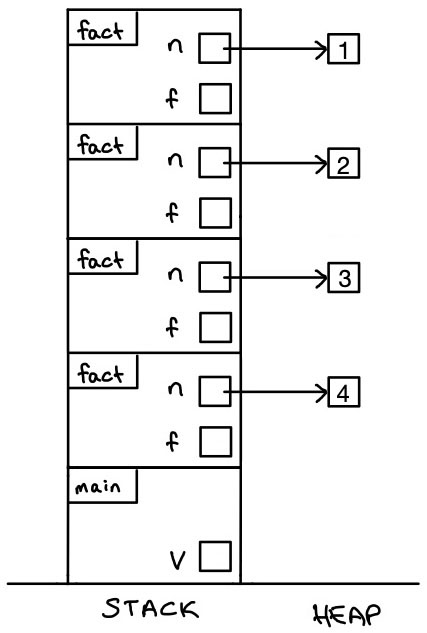
-
The final output of this program is:
Output:
24
2. Designing Recursive Functions
For this part of the lab, you will design and implement recursive functions.
When designing recursive programs, identify the base case(s) first: the simplest case where there is not a recursive call. Then move on to the recursive case(s).
Count letters
In the file count_letters.py, write a recursive function called
count_letters(s, index) that takes a string s and an integer index and
returns a count of the total number of characters in the string (including
spaces, numbers, and all other characters).
Be sure that your solution includes a main function that tests your
count_letters function with a few different parameter values.
Your solution must be recursive.
def count_letters(s, index):
    """
    Recursively count the number of characters in a string.

    Parameters:
        s (string):  The string whose characters the function will count.
        index (int): The next index to count within the string.

    Returns:
        (integer): The number of characters in the string s.
    """
Examples:
# First example
count = count_letters("hello world", 0))
print(count)  # prints: 11

# Three more examples
print(count_letters("hello", 0))       # prints: 5
print(count_letters("Swarthmore", 0))  # prints: 10
print(count_letters("", 0))            # prints: 0
Scale numbers
In the file scale_numbers.py write a recursive function called
scale_numbers(lst, index, scalar) that takes a list of integers, lst, an
index integer, and a scalar value, scalar, and returns a new list that
contains each of the values from lst multiplied by scalar.
Your solution must be recursive.
def scale_numbers(lst, index, scalar):
    """
    Recursively multiply the numbers in a list by a scalar value.

    Parameters:
        lst (list): The list whose values should be multiplied.
        index (int): The next index to scale within the list.
        scalar (integer): The scalar value to use when multiplying.

    Returns:
        (list): A new list of numbers whose values have been scaled.
    """
Examples:
# First example
original_list = [1, 2, 3, 4]
result_list = scale_numbers(original_list, 0, 2)
print(original_list)    # prints: [1, 2, 3, 4]
print(result_list)      # prints: [2, 4, 6, 8]

# Four more examples
print(scale_numbers([1, 2, 3, 4], 0, 3))       # prints: [3, 6, 9, 12]
print(scale_numbers([10, 10, 20, 20], 0, 5))   # prints: [50, 50, 100, 100]
print(scale_numbers([5, 10, 15, 20], 0, 1))    # prints: [5, 10, 15, 20]
print(scale_numbers([5, 10, 15, 20], 0, 0))    # prints: [0, 0, 0, 0]
Replace letter
In the file replace_letter.py write a recursive function called
replace_letter(s, index, orig, new) that takes a string, s, an index, a
character to replace, orig, and the character to replace it with, new. The
function should produce a new string that has all instances of the orig
character replaced by the new character.
Your solution must be recursive.
def replace_letter(s, index, orig, new):
    """
    Recursively replace all instances of one character in a string with
    another character.

    Parameters:
        s (string): The string whose characters the function will replace.
        index (int): The index of the next character in the string to
                     (potentially) replace.
        orig (string): The character that should be replaced.
        new  (string): The character to use in place of the original one.

    Returns:
        (string): A new string containing the contents of s, where all
        instances of the orig character are placed by the new character.
    """
Examples:
# First example
original = "hello world"
result = replace_letter(original, 0, "l", "1"))
print(original)  # prints: hello world
print(result)    # prints: he11o wor1d

# Three more examples
print(replace_letter("Test string", 0, "a", "b"))      # prints: Test string
print(replace_letter("Test string", 0, "s", "$"))      # prints: Te$t $tring
print(replace_letter("", 0, "a", "4"))                 # prints: (blank)
Requirements
|
The code you submit for labs is expected to follow good style practices, and to meet one of the course standards, you’ll need to demonstrate good style on six or more of the lab assignments across the semester. To meet the good style expectations, you should:
In addition, you’ll need to demonstrate good top-down design practices on two or more lab assignments across the semester. To meet the top-down design expectations, you should:
|
For EACH QUESTION in the stack-diagram portion of the lab, you should meet the following requirements:
-
Draw the correct stack diagram.
-
Show the base case and recursive case.
-
Show the final output of the program.
For EACH PROGRAM in the function-writing portion of the lab, you should meet the following requirements:
-
Your function should contain a non-recursive base case.
-
Your function should make one or more recursive calls on a smaller version of the problem.
-
Your function should correctly solve the problem.
-
To test your solution, your
mainfunction should make at least three calls to the recursive function.
Helpful syntax reminders
When working through these recursion problems, we’ll frequently be using strings and lists, which are both "collections" of things: strings are collections of characters, and lists are collections of arbitrary elements. As collections, both strings and lists offer some utilities to make it easier to work with them. We’ve seen these before, but they’ll come in handy for this lab, so here’s a brief refresher:
Concatenation (+ operator)
Strings and lists both support using the + operator for concatenation:
>>> s1 = "hello"
>>> s2 = "there"
>>> s1 + s2
'hellothere'

>>> l1 = [1, 2]
>>> l2 = [3, 4]
>>> l1 + l2
[1, 2, 3, 4]
Note that when concatenating collections, the values on both sides of the plus operator must be of the same type (e.g., both strings or both lists). If you attempt to use plus on different types, you might see a message like:
>>> s1 = "hello"
>>> l1 = [1, 2]
>>> s1 + l1
Traceback (most recent call last):
  File "", line 1, in
TypeError: can only concatenate str (not "list") to str
Answer the Questionnaire
After each lab, please complete the short Google Forms questionnaire. Please select the right lab number (Lab 10) from the dropdown menu on the first question.
Once you’re done with that, you should run handin21 again.
Submitting lab assignments
Remember to run handin21 to turn in your lab files! You may run handin21
as many times as you want. Each time it will turn in any new work. We
recommend running handin21 after you complete each program or after you
complete significant work on any one program.
Logging out
When you’re done working in the lab, you should log out of the computer you’re using.
First quit any applications you are running, including your vscode editor, the
browser and the terminal. Then click on the logout icon
( or
or  ) and
choose "log out".
) and
choose "log out".
If you plan to leave the lab for just a few minutes, you do not need to log
out. It is, however, a good idea to lock your machine while you are gone. You
can lock your screen by clicking on the lock  icon.
PLEASE do not leave a session locked for a long period of time. Power may go
out, someone might reboot the machine, etc. You don’t want to lose any work!
icon.
PLEASE do not leave a session locked for a long period of time. Power may go
out, someone might reboot the machine, etc. You don’t want to lose any work!