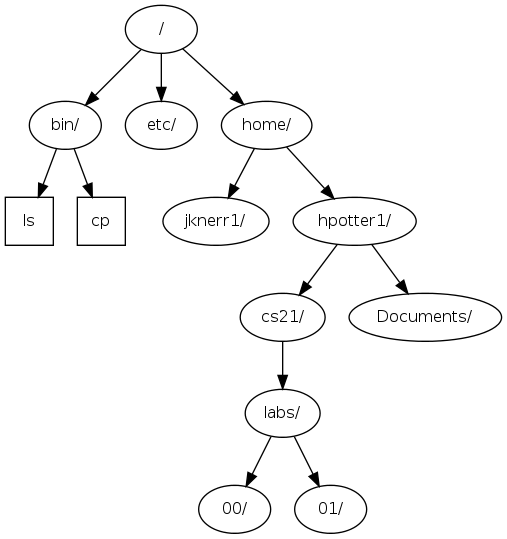
The Unix File System

The root directory (/) is the beginning or top directory for the filesystem. The Unix file system is made up of parent and sub-directories. Sub-directories are the directories inside parent directories. The root directory has no parent directories, but has many sub-directories, such as etc, var, usr, and home. A path to a directory consisists of the directories you have to open to get to it. The absolute path consists of all the parent directories of a file or directory starting with root.

The absolute path for home in the diagram above is /home, because the root directory is home's parent directory. /home is where all the users' home directories are located. The absolute path for your home directory is:

/home/yourusername

Warning: don't confuse the / at the beginning of the path (which is the root directory) with the / separating home and yourusername (which divides the two directories).

A relative path does not start with /. It consists of the directories separting your current location in the file system from the file or directory.

If you were in /home/username and wanted to get to:

/home/username/CS21/HW/hello_world.c

the relative path to this file would be:

CS21/HW/hello_world.c

There is an implicit . (called "dot") in this relative path. . (dot) means the current directory, so the above relative path could also be written as:

./CS21/HW/hello_world.c

So to look at the hello_world.c program, you could do any of the following, and they would all show you the program (using the page-by-page viewer called less):

less CS21/HW/hello_world.c
less ./CS21/HW/hello_world.c
less /home/username/CS21/HW/hello_world.c

.. (dot dot) means the parent directory (one level up). If you are in the HW directory, and then want to get to /home/username/CS21/Projects, the relative path to this file would be: ../Projects

For more information on the different directories (/etc, /var, /usr/bin, etc), see our Directories Page.